Skip to content

Pro for $5 a month. Free stays free.

Billed yearly at $59.99, or monthly if you prefer. The free tier never expires and never loses a feature.

  • Pro

    Recommended

    For a PC that looks after itself.

    $5 USD per month

    Billed $59.99 yearly · $23.89 less than paying monthly

    • Everything in Free on up to 2 PCs you use
    • Space watch to tell you when a drive is filling up
    • Automatic cleanup every week, even with eclean closed
    • Stay optimized through every Windows update
    • Automatic DNS that re-checks itself and stays fast
    • Quiet uninstall and Leftover watch for the apps you remove
    • Saved setups and Expert tweaks for the Optimizer
    • Secure delete in the File shredder
    • Twilight, Nocturne, and Fjord themes

    30-day money-back on your first subscription

  • Family

    Best value per PC

    Pro, shared with the whole household.

    $6.67 USD per month

    Billed $79.99 yearly · $1.33 per PC a month

    • Everything in Pro on up to 5 PCs in your household
    • Separate accounts with their own settings for each person
    • One subscription and one renewal for everyone

    On every PC

    • Space watch
    • Automatic cleanup
    • Stay optimized
    • Automatic DNS
    • Quiet uninstall and Leftover watch
    • Saved setups and Expert tweaks
    • Secure delete
    • Pro themes

    30-day money-back on your first subscription

Free

Not ready for Pro? The free tier never expires.

  • Optimizer
  • Junk cleaner
  • Large files
  • Booster
  • Uninstaller
  • Your PC
  • Windows Fixer

Stripe checkout with your eclean account · 30-day money-back on your first subscription · Cancel anytime, keep the free tier

You must be 18 or older to buy, or have a parent or guardian agree to the purchase. See the Terms.

All prices in USD, whatever your billing country. Pro is $6.99 per month or $59.99 per year. Family is $9.99 per month or $79.99 per year.

  • Visa
  • Mastercard
  • American Express
  • Maestro
  • Discover
  • PayPal

Pro keeps working when you don’t.

Most of Pro runs on its own schedule, then tells you what it did.

  • Every week

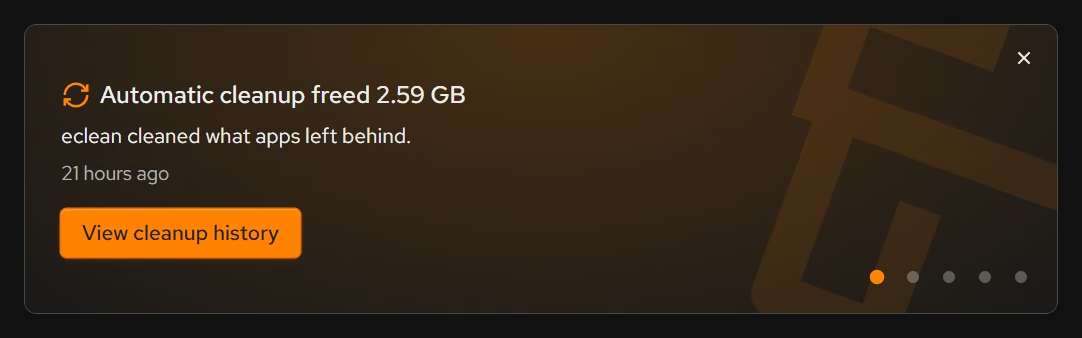
    Automatic cleanup

    Clears what apps leave behind, even with eclean closed, and tells you how much it freed.

    eclean’s Home: Automatic cleanup freed 2.59 GB of what apps left behind
  • When you switch

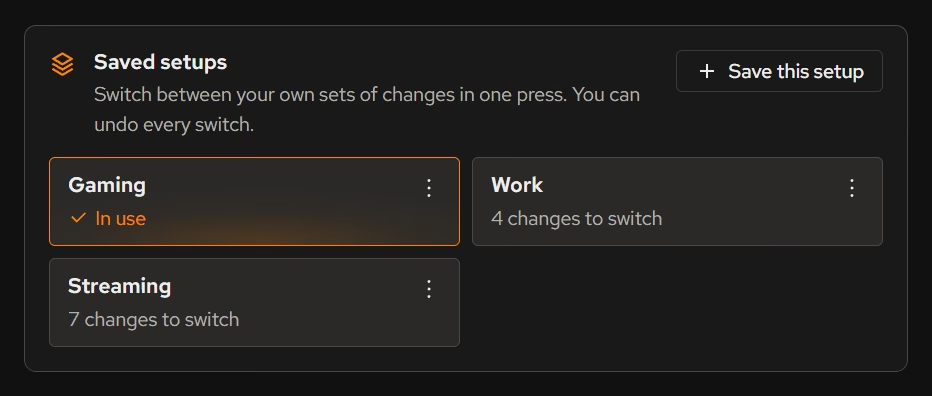
    Saved setups

    Save how your PC is set up for gaming, work, or streaming, and switch between them in one press.

    Saved setups in eclean: Gaming in use, Work and Streaming a press away
  • After every Windows update

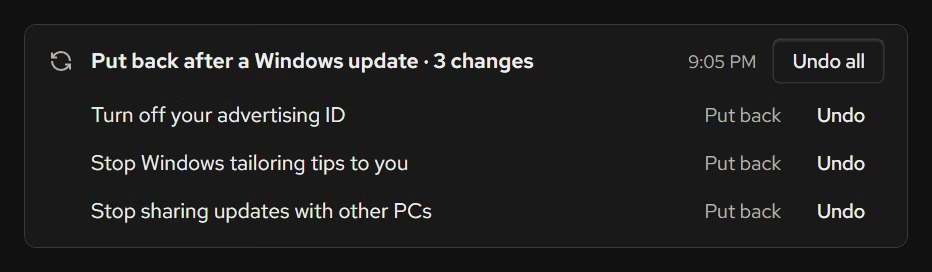
    Stay optimized

    When a Windows update undoes your changes, eclean reapplies them and tells you what it fixed.

    Stay optimized in eclean’s History: three changes put back after a Windows update, each with Undo
  • Every week, and on new networks

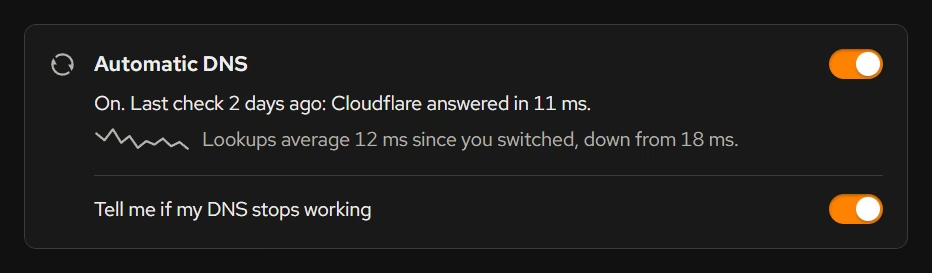
    Automatic DNS

    Re-measures DNS providers on your connection and moves you when one is clearly faster.

    Automatic DNS on in eclean: lookups average 12 ms since it switched, down from 18 ms

Pro also includes Space watch, Quiet uninstall, Leftover watch, Expert tweaks, Secure delete, and three themes (Twilight, Nocturne, and Fjord).

Every plan, side by side.

Family doesn't add features over Pro, it adds room for the whole household.

Feature availability by eclean plan
FeatureFree $0Pro $59.99 USD per year $23.89 less than monthlyFamily $79.99 USD per year $39.89 less than monthly
Optimizer
Explained recommendations Privacy, performance, and network changes in plain language.
Change history with a route back
Stay optimized Puts your changes back when a Windows update turns them off.
Saved setups Switch between setups like Gaming and Work in one press.
Expert tweaks CPU, timer, and power changes for experienced users.
Cleaner
Junk cleaner for browsers, apps, Windows, and games
Large files on every drive at once
File shredder Quick deleteSecure overwriteSecure overwrite
Automatic cleanup Clears what apps leave behind every week, even with eclean closed.
Space watch Tells you from the tray when a drive is filling up, and which folder grew.
Booster
Startup apps, services, and scheduled tasks
DNS Optimizer Measures DNS providers on your connection, with encrypted lookups and blocking.
Automatic DNS Re-checks every week and on new networks, and switches you when another provider is clearly faster.
Uninstaller
Desktop apps, Store apps, and browser extensions
Remove several apps at once, leftovers included
Quiet uninstall Skips the screens of uninstallers eclean recognizes.
Leftover watch Tells you within minutes, even from the tray, when an app is removed outside eclean.
Your PC
Hardware and Windows overview
Live sensors
Windows Fixer Reset network, audio, or Microsoft Store settings, renew your IP, or flush DNS.
Your plan
PCs with Pro 2 PCs5 PCs
Separate accounts for each person
Pro themes Twilight, Nocturne, and Fjord.
Download eclean

Free to start. Upgrade here or from inside eclean whenever you are ready.

Fair questions, straight answers.

Is the free version actually useful?

Yes. The core of eclean, understanding your PC and keeping it tidy, is free without time limits or nagging. Pro adds the upkeep that runs on its own, like weekly cleanup.

Why a subscription and not a one-time license?

Because subscriptions are our only revenue, and we would rather be funded by people choosing to stay than by data sales, bundled offers, or paid major upgrades. Subscribers fund the free tier, and if you stop paying you keep it. Our finances are public if you want to check the claim.

How does the free trial work?

Your first Pro or Family subscription starts with a free trial, and the pricing page shows how long it runs. Checkout asks for a card so the plan can renew, but nothing is charged until the trial ends, and Stripe emails you a few days before that. Cancel from Billing in your account before the end and you pay nothing, and eclean returns to the free tier. It is one trial per person, and it is never offered on top of a running discount.

Can I use one license on several PCs?

A Pro license covers up to 2 PCs you personally use, so install eclean on your desktop and laptop with the same account. For a household with several people, the Family plan shares Pro across up to 5 PCs, each with their own account.

What happens if I stop paying?

eclean returns to the free tier. Nothing breaks, nothing is deleted, and every change you applied stays exactly as you left it, including its route back.

What payment methods do you support?

Checkout runs through Stripe, so your payment details never touch our servers. Depending on your country, currency and plan, Checkout can offer major cards (including Apple Pay and Google Pay), Link, PayPal, Amazon Pay, Revolut Pay, bank debits (SEPA and ACH), local methods such as iDEAL | Wero, Bancontact, BLIK, Pix and UPI, and Klarna. Checkout only shows the ones that work for your purchase, and the list can change over time. If yours is missing, tell us on the community forum.

Do you support digital wallets?

Yes. Apple Pay, Google Pay, and Link all work at checkout, so on most devices paying is one confirmation rather than a form. Wallets follow the same refund and cancellation rules as every other method.

Do you offer refunds?

Yes, generous ones. Every purchase, renewals included, has a 14-day no-questions refund, and your first subscription is covered by a full 30-day money-back guarantee. The details are in our refund policy, but the short version is that you contact us and we make it right.

Free until Pro earns it.

Download eclean on Windows 10 and 11 and upgrade from inside the app whenever you are ready.

Download eclean