


Cleaner · Booster
eclean vs Advanced SystemCare
Advanced SystemCare grades your PC and fixes everything in one click. Here is how eclean compares on cleaning, speed-up claims, and upsell pressure.
Last checked

CPU-Z is the veteran spec sheet for Windows hardware. Here is how eclean compares on knowing your PC, and on watching it work.
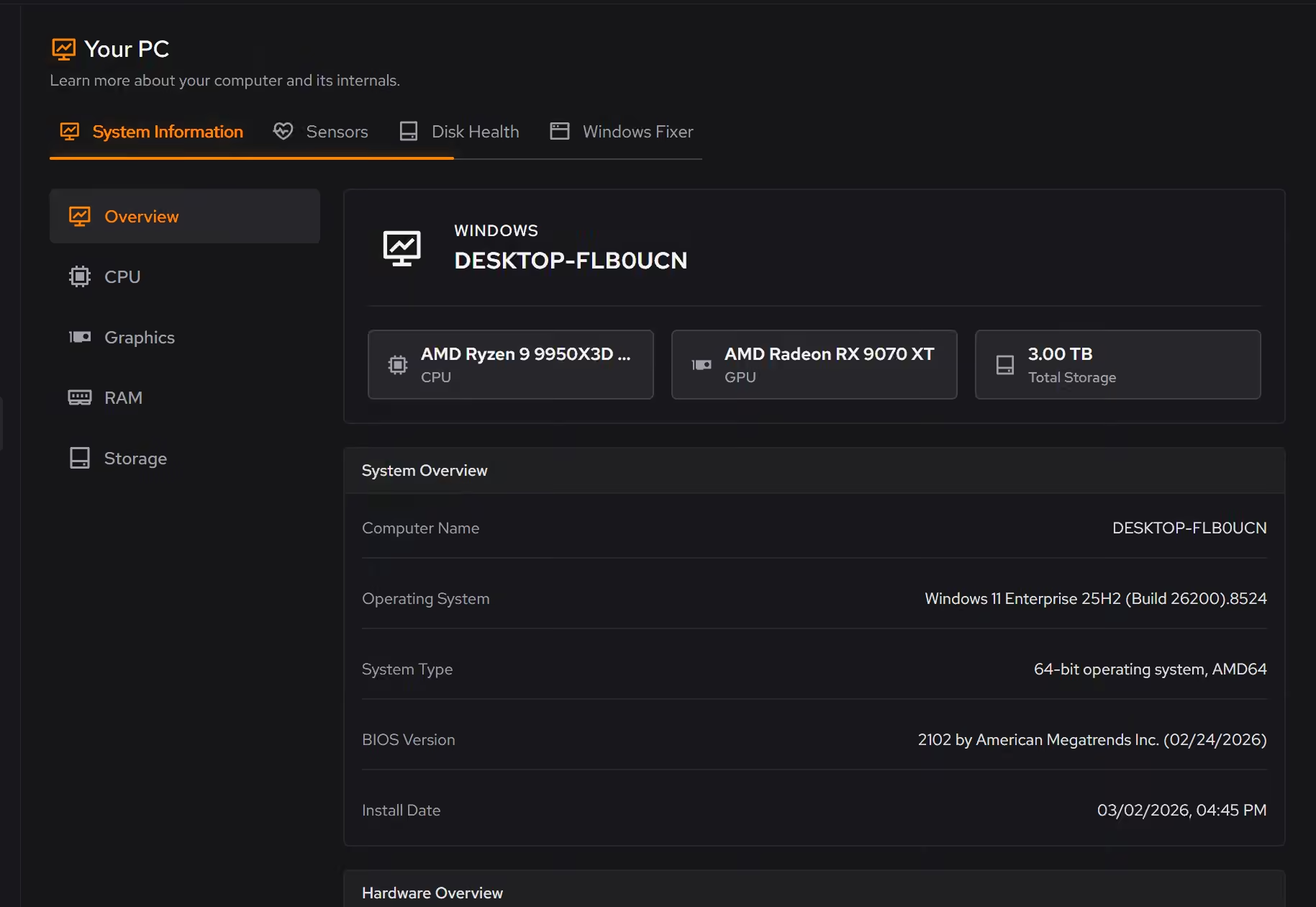
CPU-Z is the reference card for silicon detail, and for overclockers it stays useful. eclean's Your PC answers the questions most people actually have (what is in this machine, and what is it doing right now) in plain language, with live monitoring across the whole system, free.
Free · Windows 10 and 11
Stay with CPU-Z if…If this list sounds like you, CPU-Z is a fine choice.
The same jobs, done two ways.
With eclean
Your PC presents Windows build, firmware, processor, graphics, memory, storage, and network the way you would explain it to a friend, not as a parts database.
With CPU-Z
CPU-Z speaks fluent datasheet (steppings, revisions, SPD tables). Precise, but you need to already know what the numbers mean.
With eclean
Live CPU, graphics, memory, storage, and network views show what is being asked of the hardware the moment something feels wrong.
With CPU-Z
Clocks and voltages update live for the CPU, but there is no view of overall load, no storage, network, or per-area monitoring to answer "why is it slow?"
With eclean
Knowing your hardware is one module of a maintenance app. The same download cleans, trims startup, and manages what runs in the background.
With CPU-Z
CPU-Z identifies hardware and benchmarks the CPU. Whatever you learn, acting on it happens somewhere else.
CPU-Z is the long-standing free utility for identifying your processor, memory, and motherboard down to stepping and timings. Here is how the two line up, feature by feature.
| Capability | eclean Free, or Pro at $45.99 USD/year | CPU-Z Free |
|---|---|---|
| Knowing your PC | ||
| Processor, memory, and motherboard details | ||
| Graphics, storage, and network inventory | Graphics only | |
| Windows version, build, and firmware together | ||
| Deep silicon detail (steppings, SPD timings) | Essentials | |
| Watching it work | ||
| Live sensors and usage views | CPU clocks and voltages | |
| Live storage and network activity | ||
| Focused views for hunting bottlenecks | ||
| How it treats you | ||
| Free | Free for everyone | Entirely free |
| Plain-language presentation | ||
| Part of a full maintenance toolkit | ||
Checked by Jack Holmes. Last checked . Spot something out of date? Tell us and we'll fix it.
Sources: CPU-Z product page
Everything CPU-Z does here lives in one module of the same free download.
Every recommendation says what it changes and why before you commit to it.
Supported changes keep an undo history, so trying something is never a commitment.
Scans and cleaning run locally. The contents of your files never leave your machine.
“yeah seems to be good so far”
R M
CPU-Z has been the answer to "what exactly is in this machine?" since the early 2000s, and inside its lane it is excellent: free, tiny, and precise to the stepping. Overclocking communities standardized on it for a reason, and none of that changes today.
But precision is not the same as understanding. CPU-Z tells you your memory is running at a certain frequency with certain timings; it does not tell you whether that is why your game stutters.
When most people open a hardware tool, the real question is "is my PC okay, and what is it doing right now?" That is the question Your PC is built around. The inventory reads like a person wrote it: Windows build, firmware, processor, graphics, memory, storage, network. The live views show demand as it changes, so the moment the fans spin up you can see which part of the system is being asked to work.
It is also free for everyone. Your PC is the one eclean module with no Pro tier at all, because understanding your own hardware should not be a paid feature.
If you need stepping-level silicon detail or a benchmark number your community recognizes, keep CPU-Z installed; it costs nothing and stays the specialist. For everything else, Your PC covers the whole journey in one place: knowing the machine, watching it work, and acting on what you find with the rest of eclean's toolkit.
Cleaner · Booster
Advanced SystemCare grades your PC and fixes everything in one click. Here is how eclean compares on cleaning, speed-up claims, and upsell pressure.

Cleaner · Booster · Uninstaller
AVG TuneUp automates PC maintenance behind a subscription. Here is how eclean compares on background apps, cost over time, and vendor track record.

Cleaner
BleachBit is free, open source, and genuinely powerful. An honest look at where it wins and what eclean adds in explanation, coverage, and support.